How to Sign Up for ChatGPT AI | Step-by-Step Tutorial for Beginners
リアクション
2026年09月09日
How to Sign Up for ChatGPT AI | Step-by-Step Tutorial for Beginners
Want to start using ChatGPT but don't know how to create an account? In this video, you'll learn how to sign up for ChatGPT AI step by step, from opening the official ChatGPT website to completing the account setup process.
We'll walk through the sign-up process in a simple way so beginners can easily follow along.
In this tutorial, you'll learn how to:
Open the official ChatGPT website
Find the Sign Up option
Create a ChatGPT account
Sign up using an available authentication method
Complete the account setup process
Log in to your new ChatGPT account
Start your first ChatGPT conversation
Understand the difference between signing up and logging in
Troubleshoot some common sign-up issues
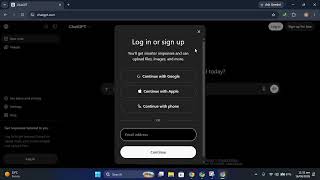
You can access ChatGPT through the official website at ChatGPT.com. The current sign-up page provides options such as Google, Apple, phone, or email, depending on availability.
Creating an account also lets you save your conversation history and access additional account features. ChatGPT may also be available without an account in supported regions, but conversations made while logged out aren't saved to your account history.
We'll also cover what to do if you encounter problems during registration, such as an account already existing or difficulty completing the login process. If you previously signed up using Google, Apple, Microsoft, or another method, you generally need to use the same authentication method when logging in.
Watch the full video to learn how to create your ChatGPT account and start using AI for writing, learning, research, brainstorming, productivity, and much more.
Don't forget to like the video, subscribe to the channel, and turn on notifications for more ChatGPT, AI, technology, and beginner-friendly tutorials.
Hashtags
#ChatGPT #ChatGPTForBeginners #ChatGPTSignUp #ChatGPTTutorial #AIForBeginners #ArtificialIntelligence #ChatGPTAccount #LearnChatGPT #AITutorial #ChatGPTGuide #OpenAI #GenerativeAI #AI #Technology #ChatGPTTips
Want to start using ChatGPT but don't know how to create an account? In this video, you'll learn how to sign up for ChatGPT AI step by step, from opening the official ChatGPT website to completing the account setup process.
We'll walk through the sign-up process in a simple way so beginners can easily follow along.
In this tutorial, you'll learn how to:
Open the official ChatGPT website
Find the Sign Up option
Create a ChatGPT account
Sign up using an available authentication method
Complete the account setup process
Log in to your new ChatGPT account
Start your first ChatGPT conversation
Understand the difference between signing up and logging in
Troubleshoot some common sign-up issues
You can access ChatGPT through the official website at ChatGPT.com. The current sign-up page provides options such as Google, Apple, phone, or email, depending on availability.
Creating an account also lets you save your conversation history and access additional account features. ChatGPT may also be available without an account in supported regions, but conversations made while logged out aren't saved to your account history.
We'll also cover what to do if you encounter problems during registration, such as an account already existing or difficulty completing the login process. If you previously signed up using Google, Apple, Microsoft, or another method, you generally need to use the same authentication method when logging in.
Watch the full video to learn how to create your ChatGPT account and start using AI for writing, learning, research, brainstorming, productivity, and much more.
Don't forget to like the video, subscribe to the channel, and turn on notifications for more ChatGPT, AI, technology, and beginner-friendly tutorials.
Hashtags
#ChatGPT #ChatGPTForBeginners #ChatGPTSignUp #ChatGPTTutorial #AIForBeginners #ArtificialIntelligence #ChatGPTAccount #LearnChatGPT #AITutorial #ChatGPTGuide #OpenAI #GenerativeAI #AI #Technology #ChatGPTTips