How I Turned Workflowy Into an AI-Powered Personal Assistant with Codex / ChatGPT Work
リアクション
2026年07月14日
Want to use Workflowy as a personal database, give an AI agent the context it needs, and keep working with it from your phone?
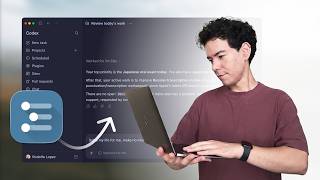
In this video, I walk through the setup I’m using: Workflowy, the Workflowy CLI, a simple AGENTS.md file, and ChatGPT/Codex.
You’ll see how to:
• Connect Workflowy to an AI agent through the Workflowy CLI
• Set up an AGENTS.md file so the agent understands your workspace, routines, preferences, and safety boundaries
• Run useful workflows like daily briefs, brain dumps, and scheduled tasks
• Keep your Workflowy notes connected to local files on your computer
• Access and steer your work from the ChatGPT mobile app
This is based on my own setup, so you’ll definitely want to adapt the AGENTS.md file to your own Workflowy account, bookmarks, and way of working.
Resources:
ChatGPT for desktop (includes Codex):
https://chatgpt.com/download/
ChatGPT mobile app:
iOS: https://apps.apple.com/us/app/chatgpt/id6448311069
Android: https://play.google.com/store/apps/details?id=com.openai.chatgpt
Workflowy CLI:
https://github.com/rodolfo-terriquez/workflowy-cli
Workflowy API key:
https://workflowy.com/api-key
AGENTS.md template:
https://gist.github.com/rodolfo-terriquez/7f611fa48b5ffa0513dddf8a090a04dd
If you run into any issues, leave a comment and I’ll do my best to help.
0:00 – Intro: connecting Workflowy notes to AI
0:19 – Workflowy command line interface overview
1:18 – One-stop shop for all your notes
1:48 – Getting a ChatGPT subscription
2:53 – Create a local instructions folder
3:47 – Walkthrough of the agents.md file
8:05 – Installing the Workflowy CLI
9:01 – Connecting the ChatGPT mobile app
10:22 – Live demo: daily briefing
11:32 – Demo results and summary
13:09 – Demo 2: scheduling automated tasks
15:44 – Using it on the mobile app
17:09 – Security considerations vs. other tools
18:32 – Wrap-up
In this video, I walk through the setup I’m using: Workflowy, the Workflowy CLI, a simple AGENTS.md file, and ChatGPT/Codex.
You’ll see how to:
• Connect Workflowy to an AI agent through the Workflowy CLI
• Set up an AGENTS.md file so the agent understands your workspace, routines, preferences, and safety boundaries
• Run useful workflows like daily briefs, brain dumps, and scheduled tasks
• Keep your Workflowy notes connected to local files on your computer
• Access and steer your work from the ChatGPT mobile app
This is based on my own setup, so you’ll definitely want to adapt the AGENTS.md file to your own Workflowy account, bookmarks, and way of working.
Resources:
ChatGPT for desktop (includes Codex):
https://chatgpt.com/download/
ChatGPT mobile app:
iOS: https://apps.apple.com/us/app/chatgpt/id6448311069
Android: https://play.google.com/store/apps/details?id=com.openai.chatgpt
Workflowy CLI:
https://github.com/rodolfo-terriquez/workflowy-cli
Workflowy API key:
https://workflowy.com/api-key
AGENTS.md template:
https://gist.github.com/rodolfo-terriquez/7f611fa48b5ffa0513dddf8a090a04dd
If you run into any issues, leave a comment and I’ll do my best to help.
0:00 – Intro: connecting Workflowy notes to AI
0:19 – Workflowy command line interface overview
1:18 – One-stop shop for all your notes
1:48 – Getting a ChatGPT subscription
2:53 – Create a local instructions folder
3:47 – Walkthrough of the agents.md file
8:05 – Installing the Workflowy CLI
9:01 – Connecting the ChatGPT mobile app
10:22 – Live demo: daily briefing
11:32 – Demo results and summary
13:09 – Demo 2: scheduling automated tasks
15:44 – Using it on the mobile app
17:09 – Security considerations vs. other tools
18:32 – Wrap-up